
RigWave is starting or checking the supported connection.
← ALL FEATURESV1 target • provider testing pending
Your audience shouldn’t be scattered across five windows.
Live Chat Hub is being built to bring supported Twitch, YouTube and Facebook Live chat into one clearer view, with the source kept obvious and each platform’s permissions left intact.
One combined chat view
The intended V1 target is one included overlay for supported Twitch, YouTube and Facebook Live chat with clear source labels, messages arriving from those platforms together and visible connection health.
Why it matters
Separate chat windows turn audience interaction into tab management. The aim is fewer missed messages and more attention left for the people who actually turned up.
Less tab-hopping. More actual conversation.
Release status
This feature is not available yet. Twitch, YouTube and Facebook connection journeys are still being tested with authorised accounts. A provider stays disabled until connection, reconnect, permission and moderation behaviour can be checked without guessing.
No universal scraping shortcut. Provider APIs, permissions, quotas, moderation rules and privacy boundaries stay in charge. Unsupported page scraping is not an authorised fallback.
CLEAR CONNECTION STATES
Know whether chat is actually usable.
The normal customer view should not expose internal service names or declare success before the real chat window is ready.
The usable Live Chat Hub window is open and the supported connection is available.
A permission, provider or local problem needs a clear next action.
The route cannot be used safely right now. RigWave should not pretend otherwise.
REAL TEST INTERFACE
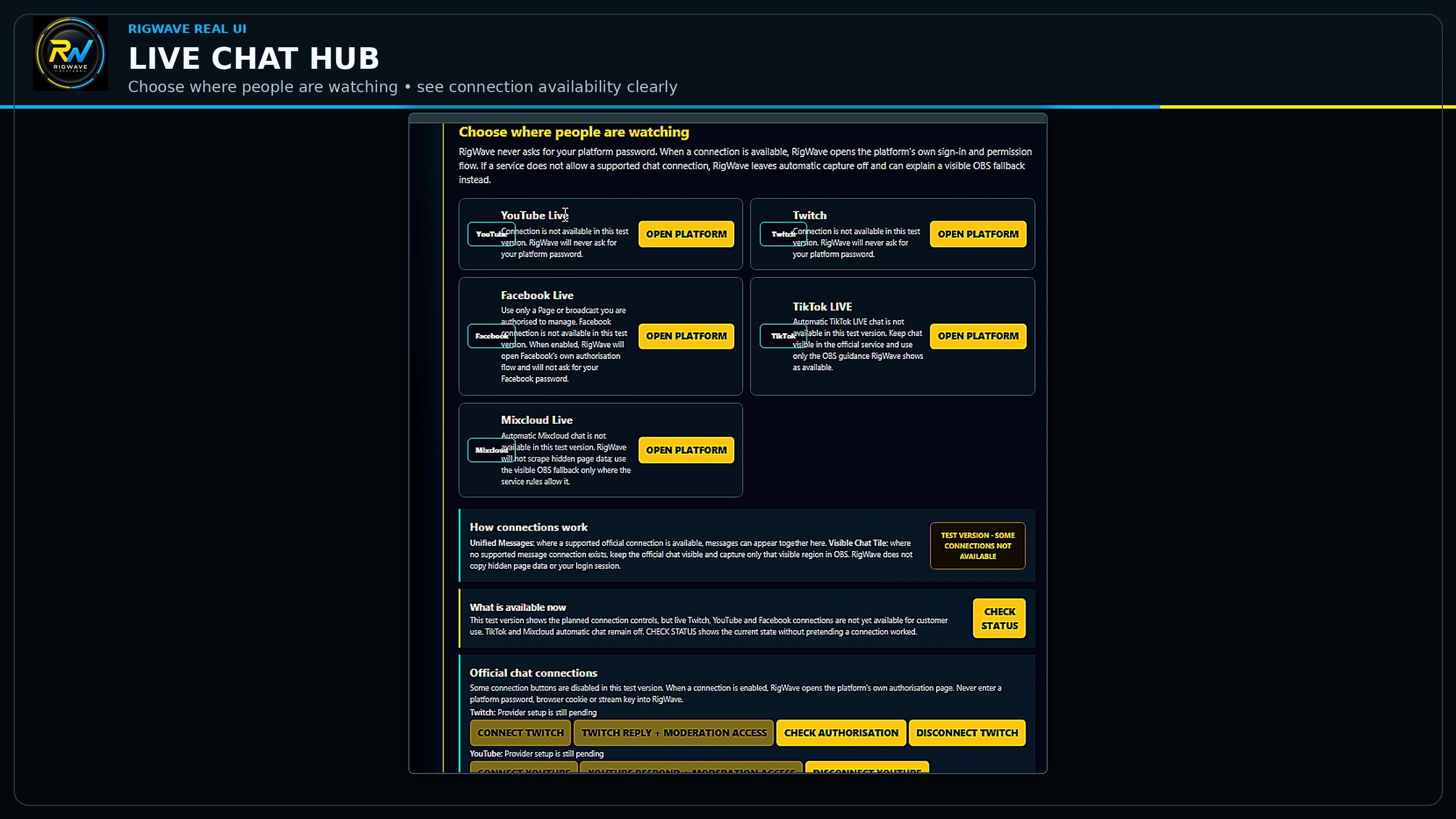
See the current Live Chat Hub interface
This is a real RigWave test-screen capture. Provider pending/unavailable states remain visible; the image is interface evidence, not live-provider PASS.
Top tips
- Use only provider connections shown as available.
- Run the safe demo before using real audience messages.
- Keep moderation controls within reach during the stream.
What the screenshot still needs to prove
The screenshot above shows the development interface. A further capture of all supported platforms working together will be added only after the final Windows build passes live-service testing.
SEE THE REAL PROOF WE DO HAVERESPONSIBLE COMMUNITY USE
Keep chat useful, lawful and safe
Use moderation tools and provider controls when chat becomes abusive. Never use connected chat to bully, threaten, stalk, impersonate, doxx or target people. If you need help with threatening or harmful online content, see Police.uk online harassment guidance ↗ and Report Harmful Content ↗.