HOW RIGWAVE WORKS
Your setup first. Everything else second.
YOUR FIRST TEN MINUTES
Start with what you have. RigWave checks what it can.
You do not need to understand Windows audio or OBS internals before you begin.
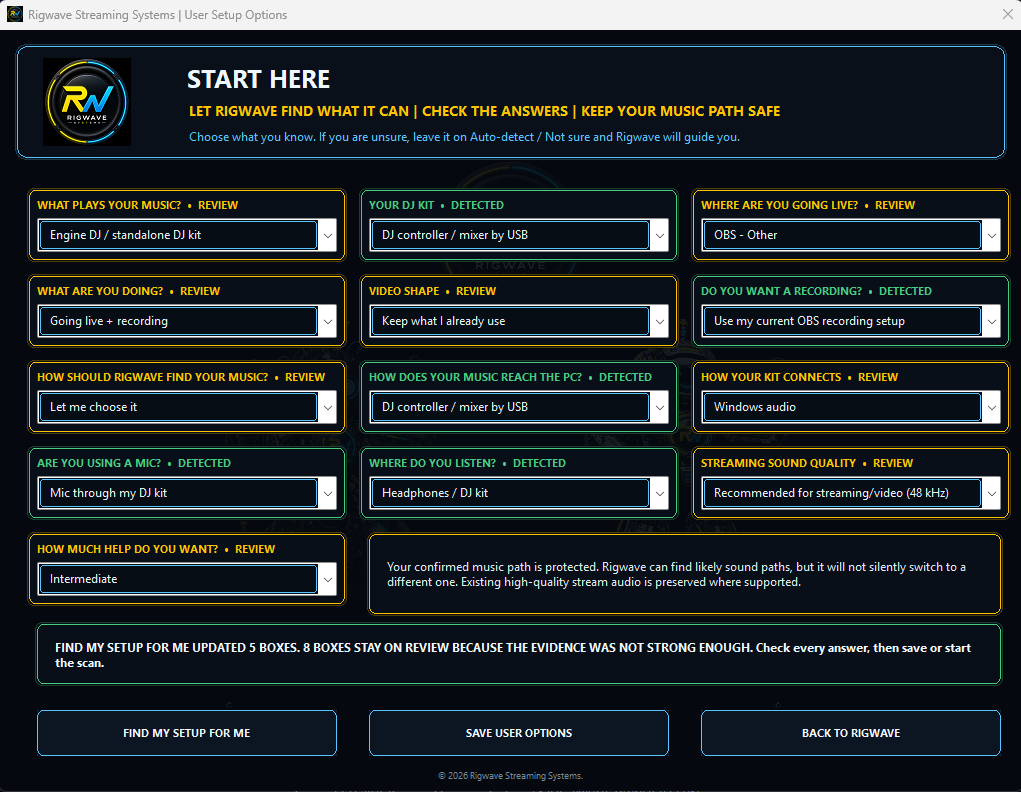
- 1Find my setup
RigWave checks supported devices, software and settings it can identify safely.
- 2Review what needs you
DETECTED means there is enough evidence. REVIEW means RigWave needs you to check the answer instead of guessing.
- 3Save my setup
Save only after the required answers are clear. If something still needs review, RigWave should point to it.
- 4Run the first check
See what was found, what changed if anything, the result and the next useful action.
DETECTED Confirmed by evidenceREVIEW Needs your checkSAVED Read back successfully
Your rig is the PC, equipment, software and settings you use to play, record or stream. RigWave is designed to check how those parts work together.
Understand → Adapt → Guide → Check
That is the product philosophy, but each step is only claimed where the current program supports it. RigWave is designed to stop or say not yet verified rather than fill gaps with confident guesses.
Your machine. Your sound. Your experience.
The PC matters. The sound matters. What your audience receives matters. A setting in one app can affect what reaches your audience. RigWave checks supported connections between the parts of your setup.