Diagnostics: turn “it broke” into useful evidence
Turn “it broke” into facts you can actually use. Review the evidence first, then choose whether to send it to support.
What you get
RigWave creates support information you can review before deliberately sending it. Normal reports are designed to leave out passwords, stream keys, access tokens, private messages and unnecessary sensitive data.
Why a report helps
Reduce repeated support questions. Instead of ten rounds of “what version?”, “which device?” and “can you screenshot that?”, give support useful facts in one go. Faster diagnosis, less rummaging, and you still control what leaves the PC.
How the intended workflow works
- Create a support report when you choose.
- Preview what it contains.
- Remove or cancel if you do not want to send it.
- Send deliberately through the support route.
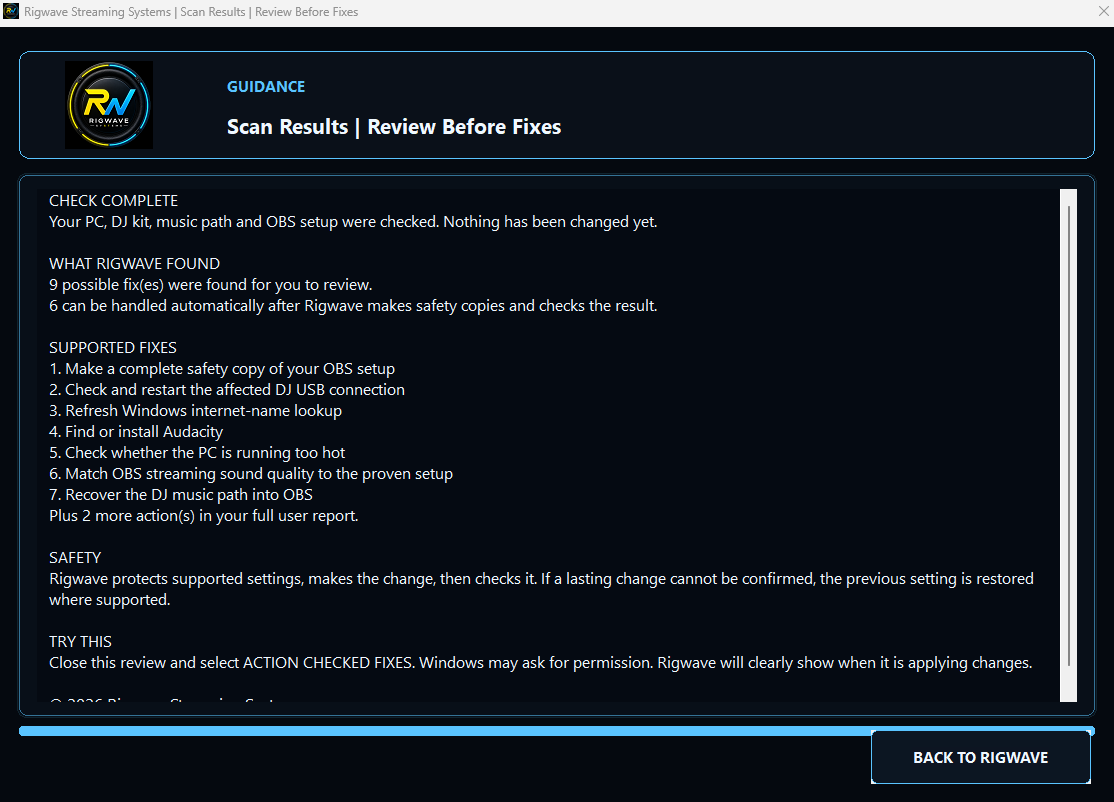
See what useful evidence looks like
A genuine findings screen showing the evidence-first approach. It proves the interface exists, not that every final support path has completed field testing.
Top tips
- Read a support bundle before sharing it.
- Remove unrelated personal information from screenshots.
- Never send passwords, stream keys, access tokens or card details.

Find the real fault. Keep the safe path visible.
Explore scanning, audio routing and troubleshooting. Finding a problem is the first step; any supported fix still needs to be checked.